What “free” actually means on 8 email platforms
Last updated 2026-09-21. Every limit on this page was read from the company's own pricing page in a browser. Kit, MailerLite and beehiiv were read on 2026-09-20; the rest on 2026-09-21. Plans change — confirm on the official page before you sign up.
The short answer
“Free” is not one offer. Across these eight platforms it means eight different shapes, and the difference between the most and least generous is not a matter of degree — it is forty times on one axis and thirty times on another.
- If you want the largest free list: Kit lists “Free—up to 10,000 subscribers” with “Unlimited email broadcasts”.[1] Nothing else here is close on both axes at once.
- If you want to automate without paying: MailerLite lists “3 automations”,[2] Sender lists “Email automation”,[4] and Loops says “All features included”.[7] Kit and beehiiv both keep automations for a paid plan.
- If you send often to a small list: look at the sending ceiling, not the subscriber one. Omnisend's free plan lists 500 emails a month against 250 contacts[6] — two sends to your whole list and you are done for the month.
The one-sentence version: every free plan has two ceilings, and on most of them the one you hit first is not the one advertised.
How we checked this (and what we did not check)
What we did. We opened each company's own pricing page in a browser and saved the text of the page as it rendered. Every limit quoted below is copied from that saved text, word for word, and we keep those saved pages so that each quote can be traced back to the page it came from. Kit, MailerLite and beehiiv were read on 2026-09-20 as part of an earlier guide; the other five on 2026-09-21.
What we did not do. We have not used any of these eight products. There are no screenshots of any of them on this page, no accounts, no test sends. We cannot tell you which editor is nicer, whose emails land better, or whose support replies faster, and we are not going to pretend otherwise from a pricing page.
Where a page did not say, we left it blank. Three of these platforms do not state on their pricing page whether automation is included free; one does not print a monthly send limit at all. Those appear below as “not stated”, not as a guess.
Every free plan we could read, in one table
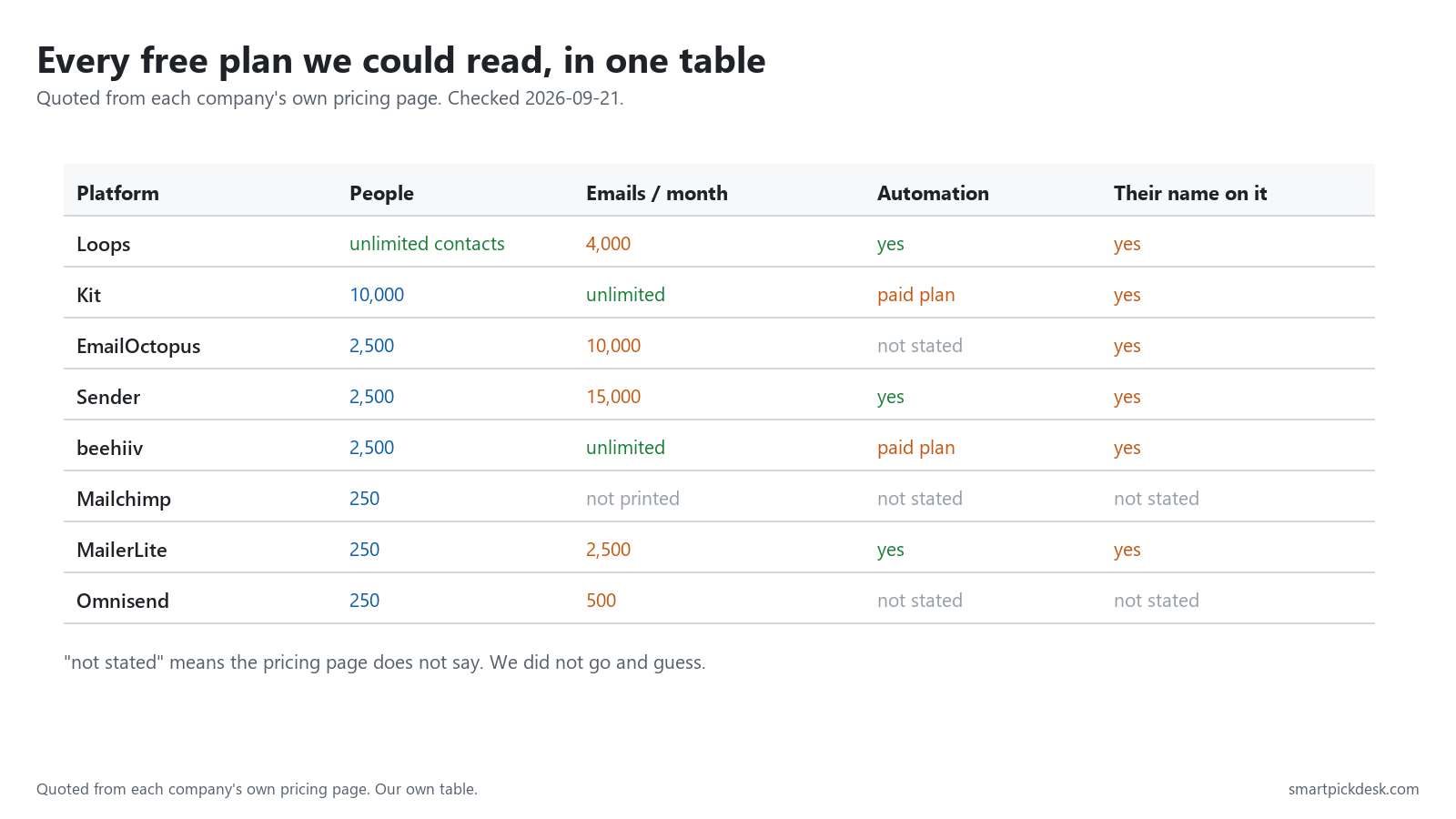
| Platform | People on the free plan | Emails per month | Automation | Their name on your email |
|---|---|---|---|---|
| Kit | 10,000 — “Free—up to 10,000 subscribers”[1] | “Unlimited email broadcasts”[1] | listed under the paid Creator plan[1] | removal sold on Creator[1] |
| beehiiv | 2,500 — “Up to 2,500 subscribers”[3] | “Unlimited Email Sends”[3] | listed under the paid Scale plan[3] | removal sold on Max[3] |
| Sender | 2,500 — “Up to 2 500 subscribers”[4] | 15,000 — “Up to 15 000 emails/month”[4] | “Email automation” on free[4] | “Contains Sender branding”[4] |
| EmailOctopus | 2,500 — “2,500 subscribers”[5] | 10,000 — “10,000 emails per month”[5] | not stated on the pricing page[5] | “EmailOctopus branding on emails”[5] |
| Loops | unlimited contacts, but it mails your 1,000 newest[7] | 4,000 — “Up to 4,000 sends in any rolling 30 days”[7] | “All features included”[7] | “Powered by Loops” footer[7] |
| MailerLite | 250 — “Up to 250 subscribers”[2] | 2,500 — “2,500 monthly emails”[2] | “3 automations” on free[2] | removal sold on Comfort[2] |
| Omnisend | 250 — “250 contacts”[6] | 500 — “500 monthly emails”[6] | not stated on the pricing page[6] | not stated on the pricing page[6] |
| Mailchimp | 250 — “Under 250 contacts? It's free.”[8] | not printed on the pricing page[8] | not stated on the pricing page[8] | not stated on the pricing page[8] |
Ceiling one: how many people you can hold
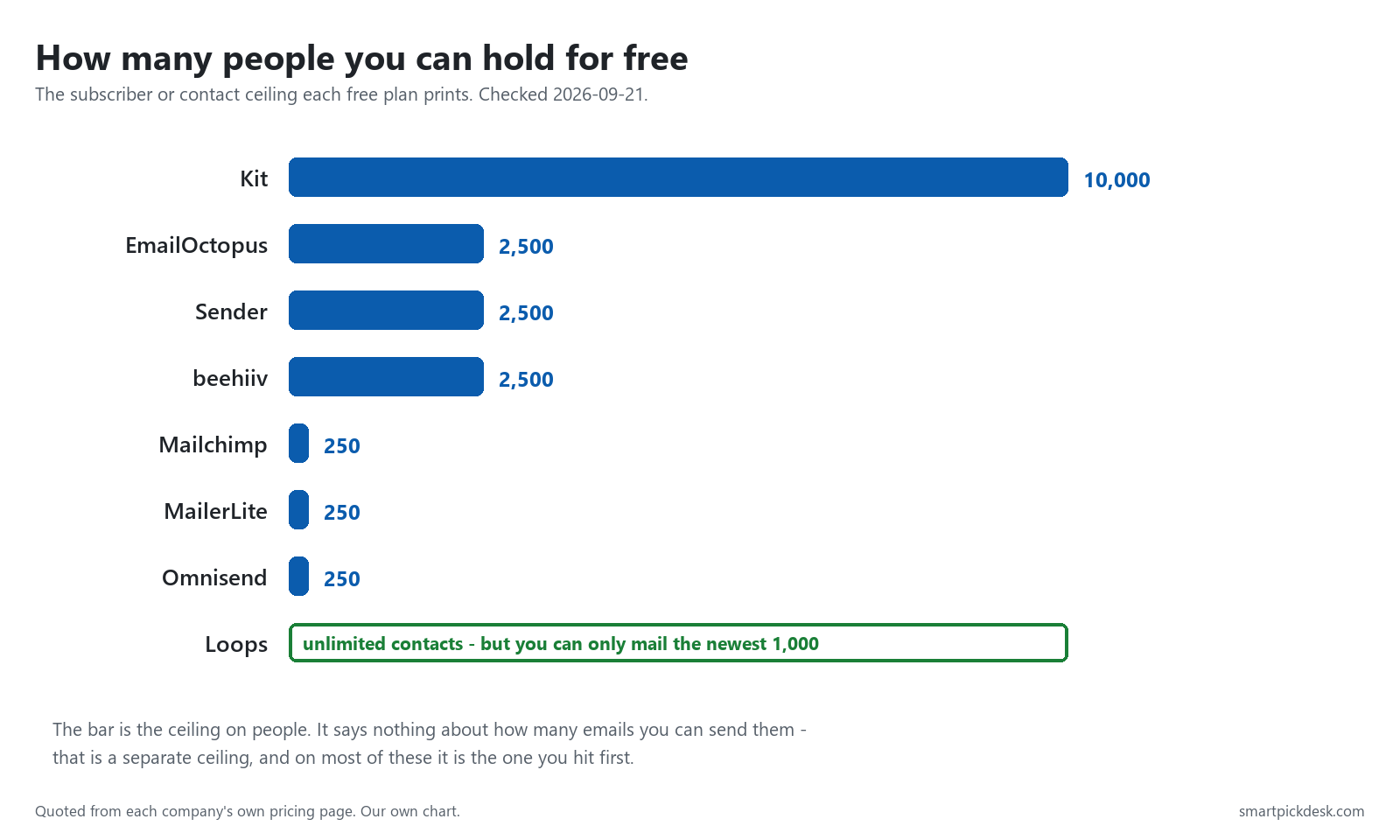
This is the number every platform puts on its pricing card, and the spread is enormous: from 250 to 10,000, a factor of forty, for the same word. Three of the eight stop at 250 — a number a modest sign-up form can reach in a few weeks.
Loops is the odd one out and worth understanding, because “unlimited” here is doing narrower work than it looks. Its page says the free plan “includes unlimited contacts and up to 4,000 total emails to your 1,000 newest contacts”.[7] You may store everyone; you may only mail the most recent thousand. That is a storage limit removed, not a sending limit removed.
Ceiling two: how many emails you can send
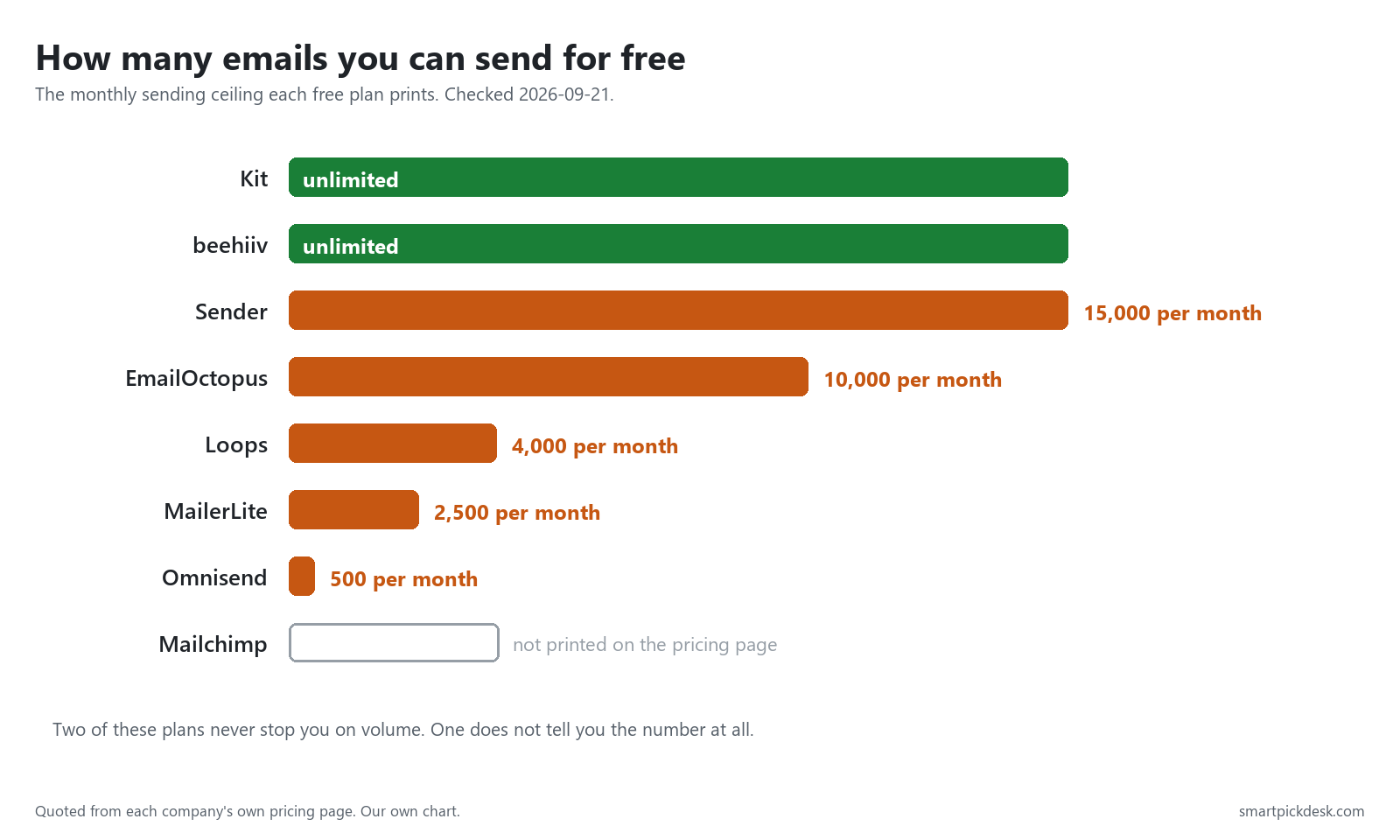
This is the ceiling people forget, and it is the one that usually bites first. Two platforms remove it entirely: Kit lists “Unlimited email broadcasts”[1] and beehiiv lists “Unlimited Email Sends”.[3] The rest print a monthly number, and those numbers range from 500 to 15,000.
One platform prints no number at all. Mailchimp's pricing page tells you the free tier exists — “Under 250 contacts? It's free.” — and then warns that “Sending will be paused if contact or email send limit is exceeded” without saying what that send limit is.[8] We are not going to fill that in from somewhere else.
The number neither ceiling tells you
Here is the arithmetic that makes the two ceilings comparable: divide the monthly send limit by the number of people you are allowed to hold. That gives you how many times a month you can actually mail your whole list.
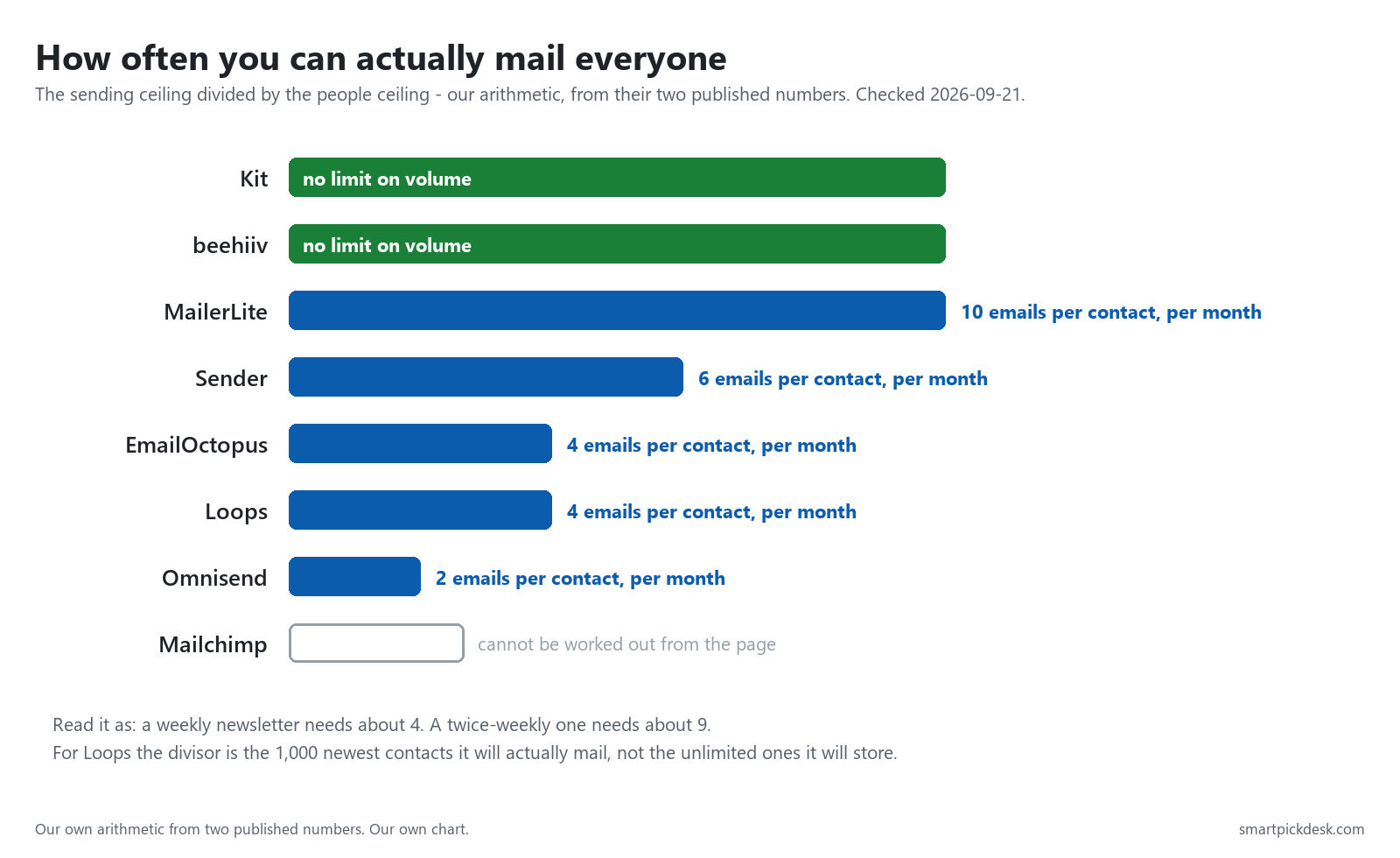
A weekly newsletter needs about four. A twice-weekly one needs about nine. Read the chart with those two numbers in mind and the free plans sort themselves:
- Kit and beehiiv have no volume ceiling at all, so the question does not arise.
- MailerLite allows ten a month per contact — comfortably more than weekly, on a very small list.
- Sender allows six, EmailOctopus and Loops about four — weekly works, twice-weekly does not.
- Omnisend allows two. A weekly newsletter is not possible on that free plan without exceeding it.
This is our own arithmetic on two numbers each company publishes, not a figure either of them quotes. For Loops we divided by the 1,000 newest contacts it will actually mail, not by the unlimited number it will store.
Can you automate a welcome email without paying?
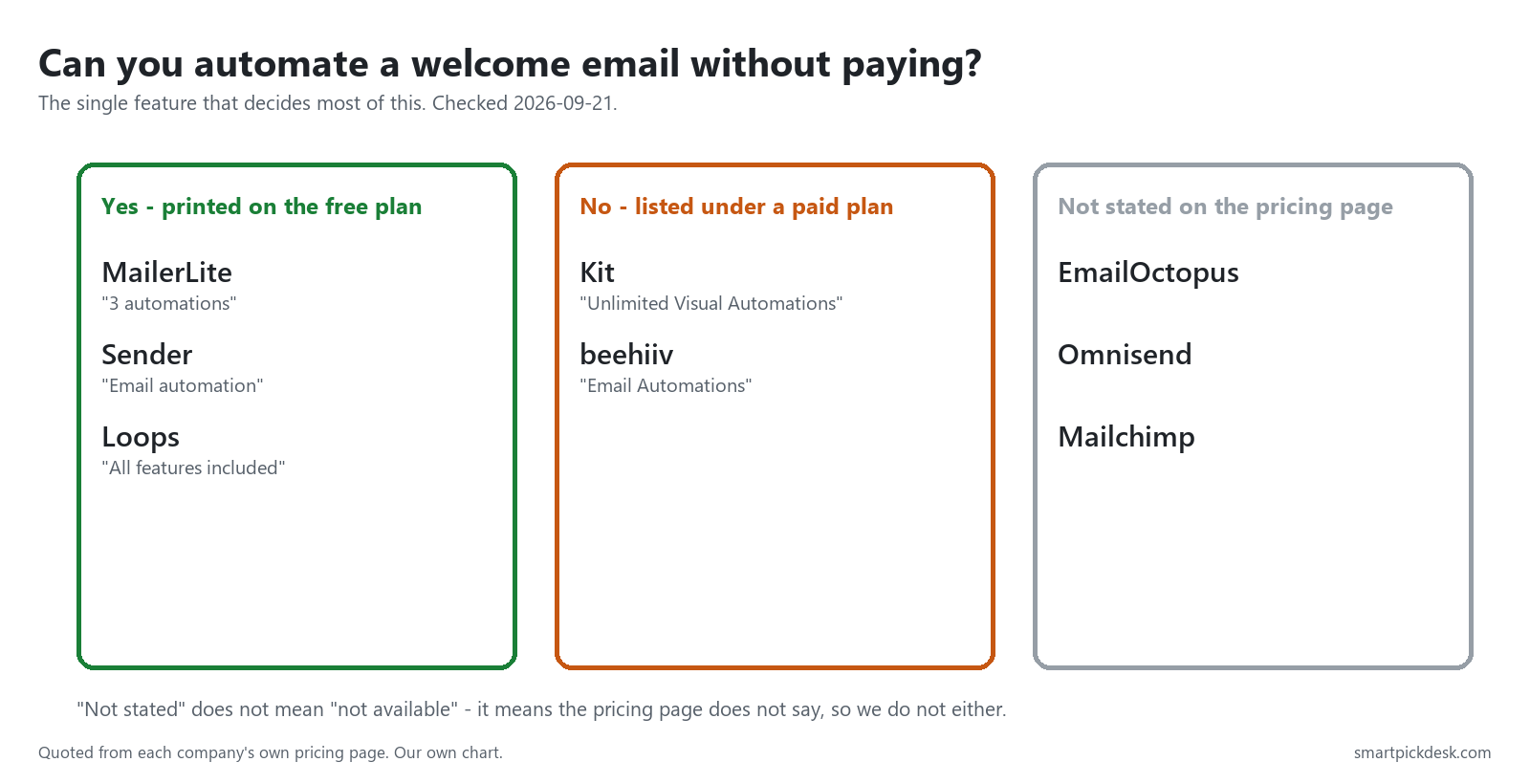
This one feature decides more choices than price does, because it is the difference between a list that greets people by itself and a list you have to remember to mail. Three of these platforms put it on the free plan, two sell it, and three do not say.
The two that sell it are the two with the most generous free sending — Kit and beehiiv — which is a coherent trade rather than a trick: room to grow for free, automation when you are ready to pay.
Whose name is on the email you send
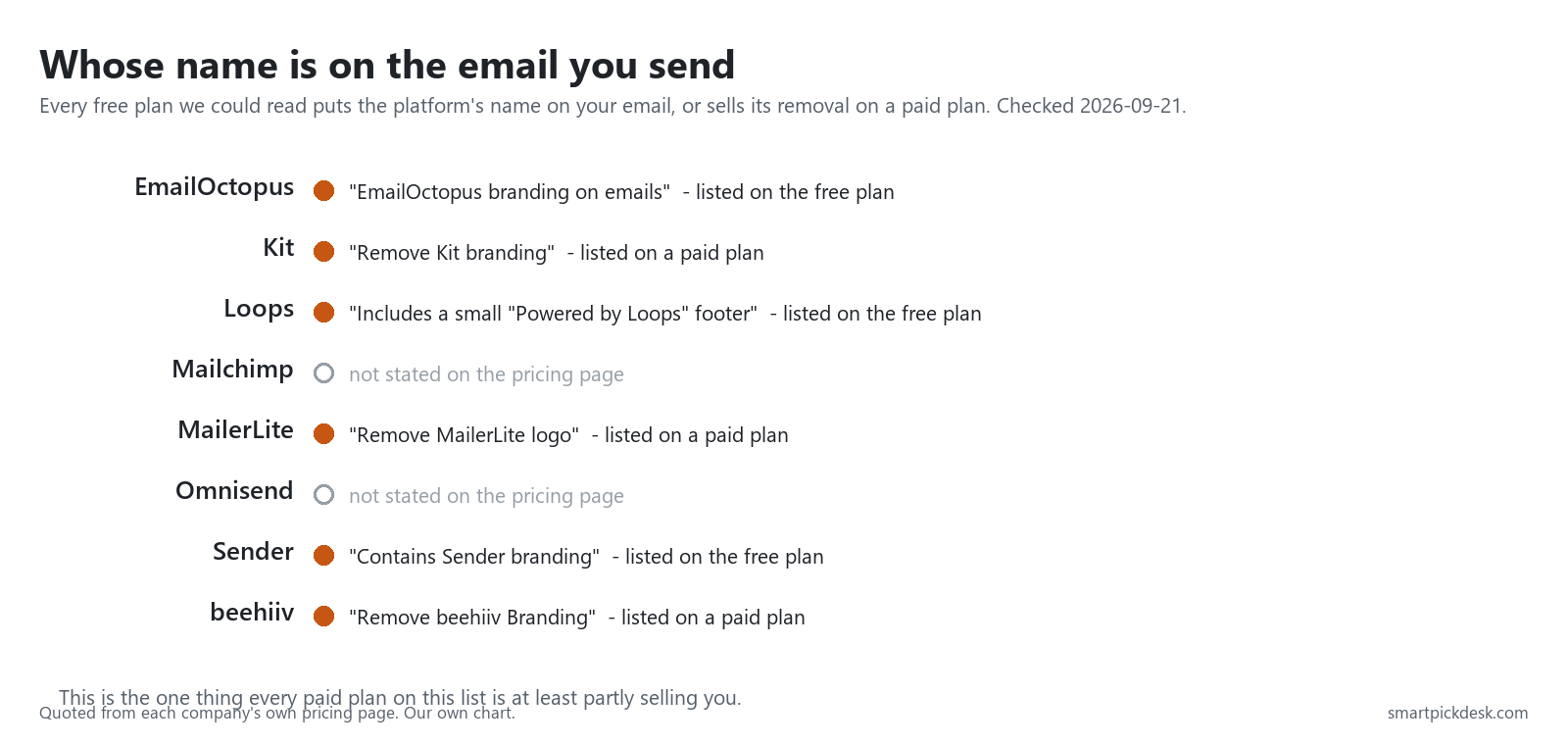
Every free plan we could read either states that its own name appears on your emails, or sells the removal of that name as a paid feature. Sender says it plainly (“Contains Sender branding”[4]), as do EmailOctopus and Loops; Kit, MailerLite and beehiiv say it in the other direction, by listing “Remove… branding” as something you buy.
Worth noting where that removal sits: Kit and MailerLite put it on their first paid plan; beehiiv puts it on its second. If unbranded email is a requirement rather than a preference, that difference is larger than any of the monthly prices.
The third thing a free plan gives you: somewhere to collect sign-ups
If you already have a website, skip this section. If you do not, it matters more than the two ceilings, because a mailing tool with no way to collect addresses is a mailing tool with nobody to mail. All eight free plans include some way to gather sign-ups; what differs is how many of them you get, and whether the tool will also host the page they sit on.
| Platform | What the free plan lists for collecting and hosting | Seats |
|---|---|---|
| Kit | “Unlimited landing pages & forms”, plus “Audience tagging & segmentation” and “Sell digital products & subscriptions”[1] | not stated |
| beehiiv | “Newsletters, Website, and Podcast”, “Custom Domains”, “Link-in-Bio”, “AI Website Builder”[3] | not stated |
| MailerLite | “1 website & 1 landing page”, “3 signup forms”, “100+ integrations”[2] | “2 user seats”[2] |
| Sender | “Landing pages”, “Signup forms & popups”, “Transactional emails”[4] | “1 seat”[4] |
| EmailOctopus | “Create 1 landing page and 1 form”, “Reports available for 30 days”[5] | “Access for 1 user”[5] |
| Omnisend | “500 Web Push notifications” alongside the email allowance[6] | not stated |
| Loops | “All features included”, with “Up to 10 emails per second”[7] | not stated |
| Mailchimp | “Use core features to manage early growth”[8] | not stated |
Two patterns are worth pulling out. First, the platforms that host the most for free are the two that also send the most for free — Kit with unlimited landing pages and forms, beehiiv with a whole website, podcast and custom domain. If you are starting with nothing but an idea, those two hand you the most infrastructure before asking for money.
Second, seats are where the small free plans quietly get smaller. Sender and EmailOctopus both say one person, explicitly. MailerLite says two. The rest do not print it. If two of you are going to work on this, that line decides more than the price does — and on half of these pages you cannot find out until after you have signed up.
As everywhere else on this page, “not stated” means the pricing page does not say. It is not a judgement about whether the feature exists.
What the pricing pages do not tell you
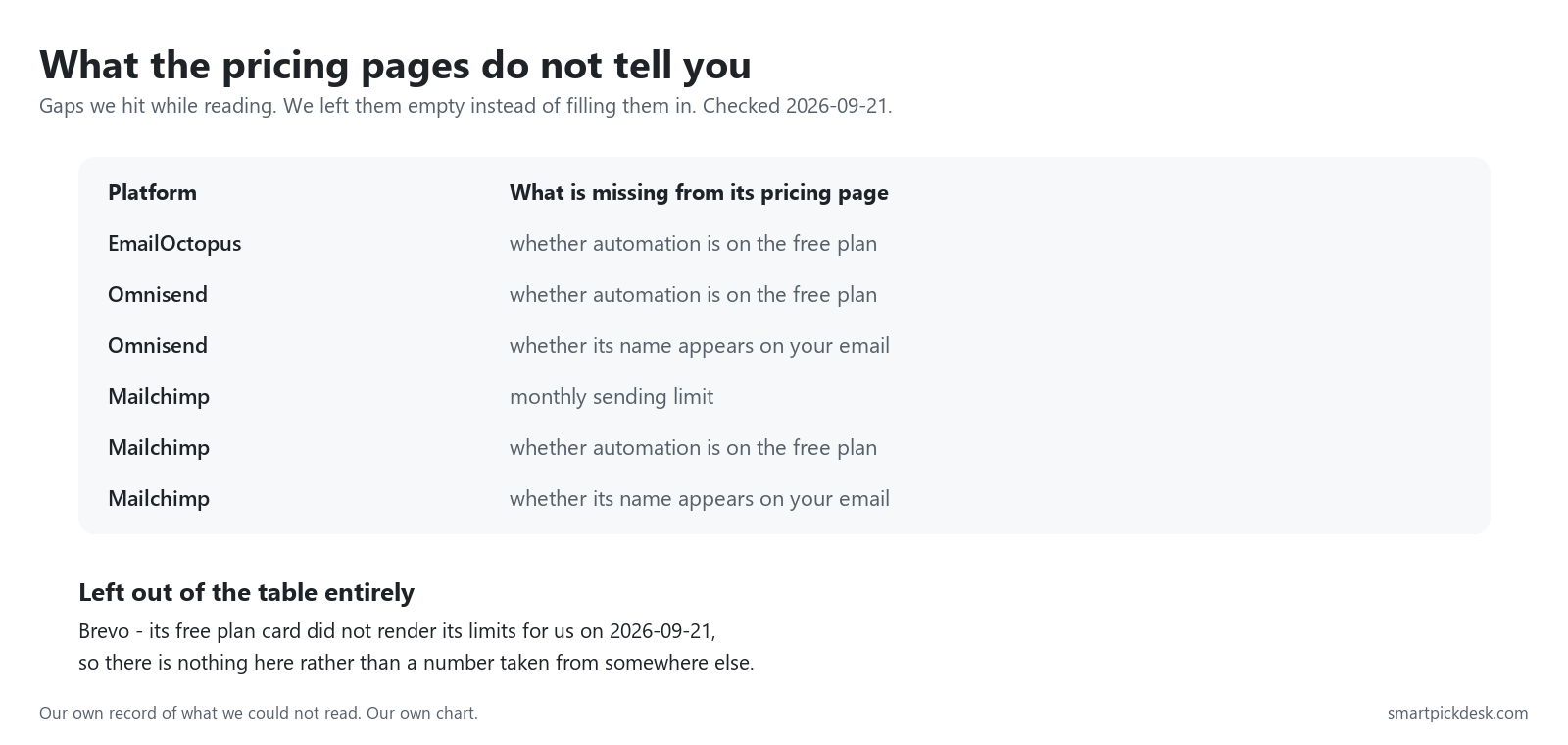
We think this is the most useful table on the page, because it is the one nobody publishes. Reading eight pricing pages back to back, the gaps are not random: the platforms that are hardest to compare are the ones that print the fewest numbers.
Brevo is missing from this guide entirely. Its pricing page showed us the free plan's heading but never rendered its limits while we were reading it on 2026-09-21. We could have taken the numbers from another article. We would then be passing on somebody else's reading as our own, which is exactly the thing this site exists not to do.
What we can check without an account — and what we cannot
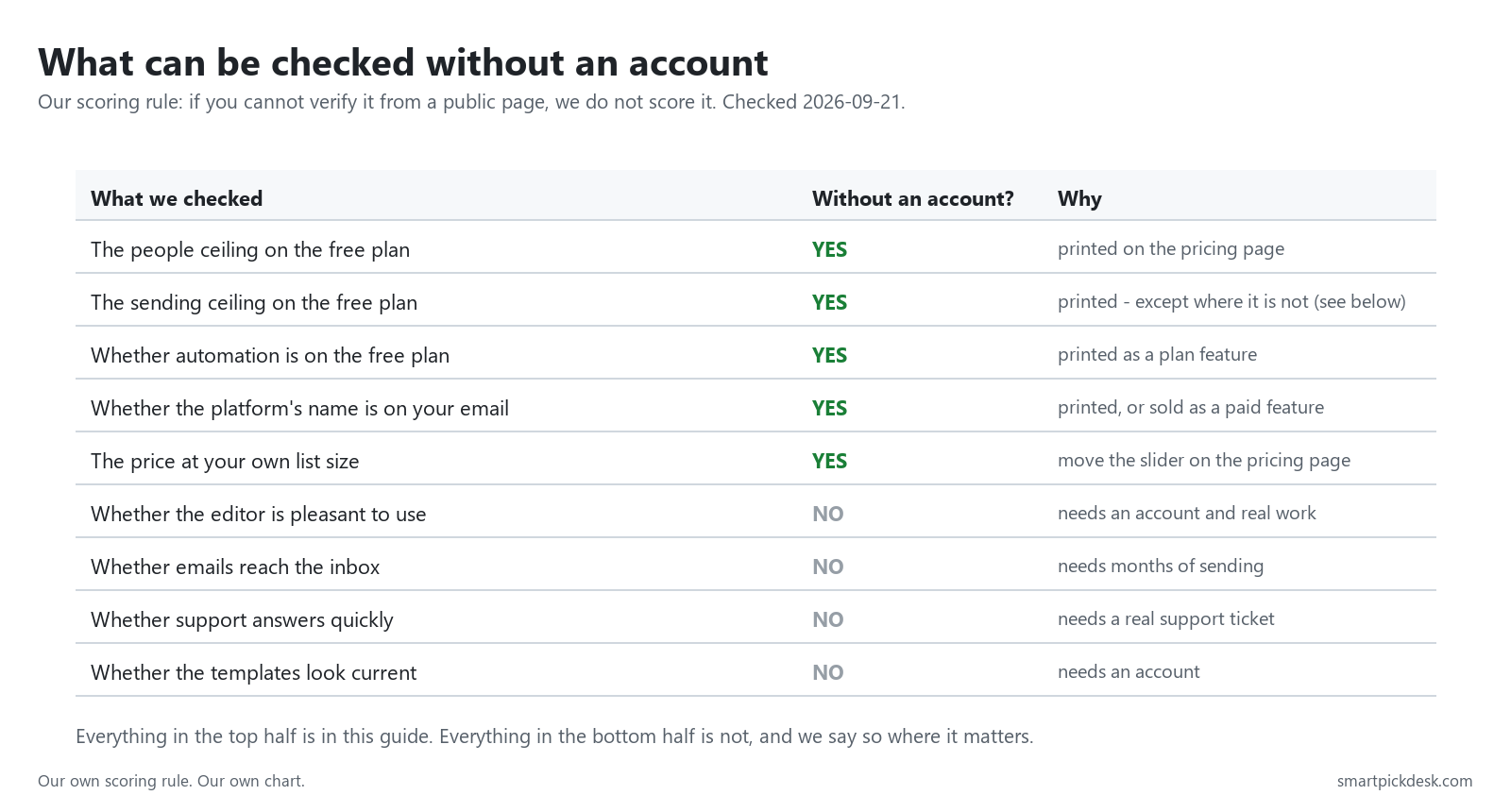
Most comparison guides score things like ease of use and deliverability. Those scores come from someone's hands-on experience, which is valuable — and which we do not have. So our rule is narrow and, we think, more useful for the question “which free plan should I start on”: if you cannot verify it from a public page, we do not score it.
Everything above the line in that table is in this guide. Everything below it is not, and for those questions you want a reviewer who has run the products for months.
Which one fits you
| If you are… | Start with | Why | Watch out for |
|---|---|---|---|
| Growing a list before you have anything to sell | Kit | 10,000 subscribers and unlimited broadcasts, free[1] | No automation until you pay |
| Launching a newsletter as the product | beehiiv | Unlimited sends, and the free plan includes the website and podcast[3] | Free stops at 2,500 subscribers |
| Wanting a welcome sequence on day one, for nothing | MailerLite or Sender | Both list automation on the free plan[2][4] | MailerLite's free list stops at 250 |
| Mailing a small list often | Sender | 15,000 emails a month against 2,500 contacts[4] | Its name is on your emails[4] |
| Wanting every feature while you are tiny | Loops | “All features included” on the free plan[7] | It only mails your 1,000 newest contacts[7] |
| Running an online store | Check elsewhere first | Omnisend is the ecommerce-focused option here, but its free plan is the tightest we measured[6] | 500 emails a month is two sends to a full list |
Which ceiling you will hit first
A rough way to predict your own wall. Take the number of people you expect within six months, and how often you plan to mail them.
| Your plan | Which ceiling bites | What to do about it |
|---|---|---|
| A few hundred people, mailed weekly | The sending ceiling, on most of these | Compare the emails-per-contact figure above, not the subscriber count |
| Thousands of people, mailed monthly | The subscriber ceiling | Only two of these free plans go past 2,500 people |
| Any size, with an automated welcome | Neither — the feature line | Three of the eight include automation free; two sell it; three do not say |
| Any size, sending on behalf of a client | The branding line | Removal is a paid feature everywhere we could read it |
For the two pairs most people actually shortlist, we have longer guides with the price at every list size: Kit vs MailerLite and Kit vs beehiiv.
Questions people ask
Which free plan holds the most subscribers?
Kit, at 10,000.[1] Loops lists unlimited contacts but will only mail the 1,000 newest of them.[7]
Which free plans let you send as much as you like?
Kit and beehiiv.[1][3] Everyone else prints a monthly number, from 500 to 15,000 — except Mailchimp, which prints none.[8]
Can I automate a welcome email for free?
On MailerLite, Sender and Loops, yes according to their pricing pages.[2][4][7] Kit and beehiiv list automations under paid plans.[1][3] EmailOctopus, Omnisend and Mailchimp do not state it.
Why is Brevo not in the table?
Its free plan limits did not render on its pricing page while we were reading it on 2026-09-21, and we do not fill gaps from other people's articles.
How many emails a month do I actually need?
Roughly four times your subscriber count for a weekly newsletter, nine for twice-weekly. Compare that with the emails-per-contact chart above before you choose.
Do you get paid if I sign up?
Not from this page — it has no affiliate links today. If that changes, it will say so at the top, and each link will be marked.
Sources and check log
| # | Source | URL | Checked | How |
|---|---|---|---|---|
| 1 | Kit, Pricing | kit.com/pricing | 2026-09-20 | Opened in a browser; page text saved and quoted from |
| 2 | MailerLite, Pricing | mailerlite.com/pricing | 2026-09-20 | Opened in a browser; page text saved and quoted from |
| 3 | beehiiv, Pricing | beehiiv.com/pricing | 2026-09-20 | Opened in a browser; page text saved and quoted from |
| 4 | Sender, Pricing | sender.net/pricing | 2026-09-21 | Opened in a browser; page text saved and quoted from |
| 5 | EmailOctopus, Pricing | emailoctopus.com/pricing | 2026-09-21 | Opened in a browser; page text saved and quoted from |
| 6 | Omnisend, Pricing | omnisend.com/pricing | 2026-09-21 | Opened in a browser; page text saved and quoted from |
| 7 | Loops, Pricing | loops.so/pricing | 2026-09-21 | Opened in a browser; page text saved and quoted from |
| 8 | Mailchimp, Marketing pricing | mailchimp.com/pricing/marketing | 2026-09-21 | Opened in a browser; the free tier is described but no send limit is printed |
| — | Brevo, Pricing — left out | brevo.com/pricing | 2026-09-21 | The free plan card did not render its limits for us; excluded rather than sourced elsewhere |
Change log
- 2026-09-21 — First published. Eight free plans read from the companies' own pricing pages; Brevo attempted and excluded.
- Previous check: none — this is the first version of this page.
- What we will re-check: both ceilings on each plan, whether Mailchimp starts printing its send limit, and whether Brevo's free card renders next time.
Who writes this
Smart Pick Desk is an independent site that compares tools for people who work online. We are not employed by, or partnered with, any company on this page, and we do not run these products in our own business. What we do is read what each company publishes, write down the date we read it, and say plainly which parts we could not check. More about this site.
We do not promise results. Nothing here is a prediction about what a tool will do for your list.